I’m sharing my Yoto Player review to help you figure out if this is the right audio player for your kid.
You’ve probably clocked that there are a couple of key options on the market – Yoto Player and its smaller sibling the Yoto Mini and the Toniebox.

You can check out my Yoto Mini review and Toniebox review for more help on those options.
All of these do similar things in a slightly different way, and the one that’s right for you really comes down to personal preference.
This Yoto review will take you through how Yoto Player works, what my kids think of it and if its the one you should buy.
This post contains affiliate links.
Quick verdict on the Yoto Player
The Yoto Player is incredibly easy to use and will be something your child will get many hours of use from.
There’s a brilliant variety of Yoto Cards (sold separately) to play – although you’ll need to fork out the cash to build up your collection – featuring stories to suit a range of ages and tastes.
The cool pixel graphic display that changes to reflect what’s being played is a big hit with my kids.
Yoto recently upgraded the Yoto to its 3rd generation – with a better quality screen and sound, plus most importantly more storage space and battery life, for use on the go.
Check out my full Yoto 3rd gen review.
As well as the Yoto Cards, kids can access the excellent Yoto Daily podcast and Yoto Radio, plus the parental controls on the app is excellent. You set things like volume, an alarm clock and more.
Although your Yoto Player needs internet connection to play Cards for the first time, it can then play them without WiFi so it can be used on the go.
This toy will be a hit with your kids and it’s a strong competitor against the Toniebox.
Get 5% off your purchase with my exclusive Yoto discount code!
Shop here using code AFF-MUMMYBUBBLE5
What is the Yoto Player
The Yoto Player is an audio player with a retro-looking pixel display that can be used to play stories, music and educational content for kids.
Kids can insert Yoto Cards (sold separately) into the top of the Yoto Player to play their favourite stories, or access free content such as the Yoto Daily podcast and the Yoto Radio station.
Yoto sells a huge range of Yoto Cards to work with your player.
You can browse the Cards by age on the Yoto website shop to help you narrow your search to find something appropriate for your child. There’s content available for kids from age 3 to 12+ – although toddlers and babies will also benefit from content such as the sleep sounds available free via the Yoto app.
Some examples include phonics lessons for younger kids, Disney stories, classic books like The Gruffalo, Enid Blyton books, and Marvel Universe stories.
Although the Yoto has a screen that shows pixel graphics that change depending on the Yoto Card being played or what the Player is being used for, it isn’t a distraction from the audio content.
So even though this toy includes a screen, I would classify it as a screen-free toy as the screen isn’t the key function of the player, it’s just something that helps engage kids with it.
Headphones can be plugged into the Yoto – making it ideal for travel on public transport or for use in a room where adults want a bit of quiet.
Yoto Player 3rd generation – what’s new?
Since writing this review Yoto has brought out its 3rd Generation Yoto Player. So what’s different.
Here are the key differences you’ll find with the new 3rd generation Yoto:
- Stereo sound
- Improved battery power with 24 hours play per charge
- USB-C charger – the player no longer comes with the charging dock, that must be purchased separately.
- 32GB storage for 600+ hours of audio for offline listening
- Temperature sensor
- Option for Bluetooth or wired headphones
What comes with the Yoto Player
- Yoto Player device
- Charging cable
- Welcome Card (which doubles as a Make Your Own audio card)
Key features
- Screen displaying pixel graphics that change depending on function and story played
- 16GB built-in storage – equivalent to 350 hours audio
- Parental control via the Yoto App
- Up to 10 hours battery life
- Headphone jack for private listening
- Alarm clock – set in Yoto App
- Can operate as a Bluetooth speaker
- Night light
- Yoto Podcast and Yoto Radio provide great free audio content
How does the Yoto Player work?
Operating the Yoto is simple. Operating it does often require a WiFi connection but it can be used without one if you have already played a card in the Player (more on that shortly).
Kids insert Yoto Cards into the top of the Player and it autoplays the content (you’ll need to be connected to WiFi that first time you play the Card).
If your child wants to stop playing that content they can simply pull the card out – and when they re-instert it playback will resume from where they got to.
Kids can adjust the volume with the dial on the left, and the dial on the right has multiple functions. If kids turn it while playing a Yoto Card they can skip through the chapters on the card – with the pixel display showing what number they have reached. They then push the button to select that chapter.
The right button can also be pushed once to play Yoto Daily (a kids daily mini podcast) and twice to play Yoto Radio. Both of these are free. They push the button again to switch the Player back to the clock mode.
The Yoto Radio has been fantastic for my kids. At night it switches to peaceful, sleepy music which I switch on to help them relax to sleep. It has really helped them to settle!
There’s an on/off button on the side of the player, plus a port to plug in 3.5mm headphones.
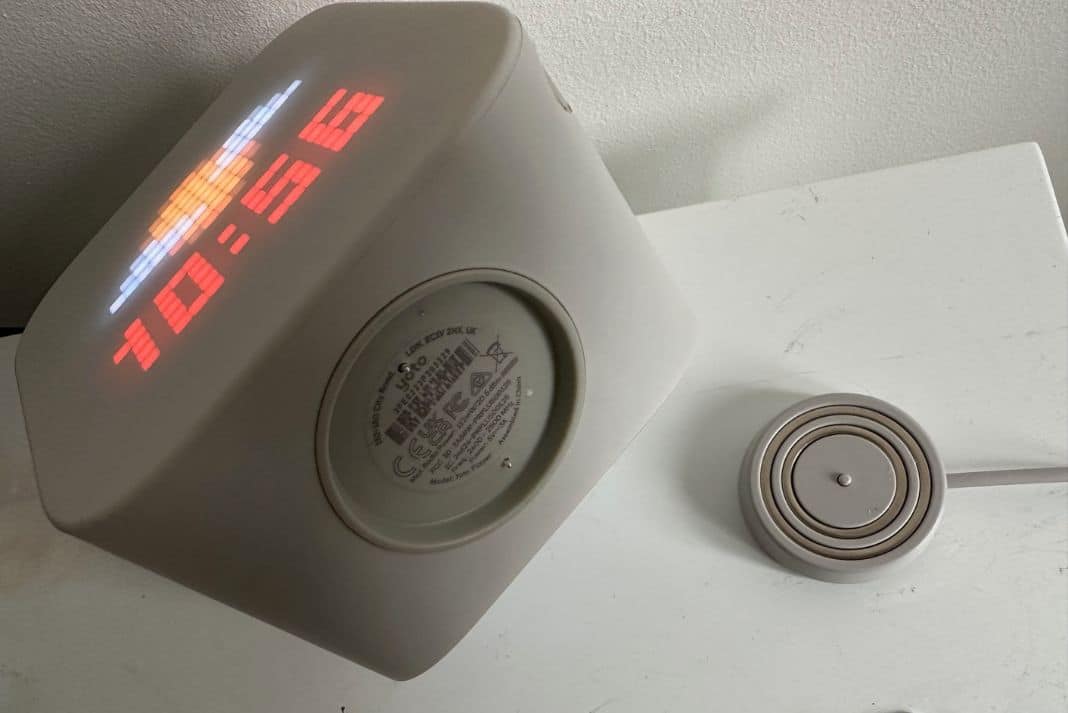
Charging is done via a magnetic docking station.
Quick start guide for the Yoto Player
You need to download the Yoto App to your smartphone in order to get started with the Yoto.
Then follow these steps:
- Plug the Yoto Player in to charge using magnetic docking station.
- Follow the instructions in the app to connect your Yoto to your home WiFi.
- You’ll also be prompted to set up a family account with Yoto. Other adults can download the Yoto app and be connected to your family account.
How to turn Yoto Player into a night light
Kids simply place the Yoto face down when they want to use it as a night light.
The downside of this is it means the clock is not on display, but they can still play content.

Parents can change the colour of the night light in the app.
What can parents do in the Yoto App
The Yoto App gives you total control of the Yoto Player, including the volume and alarm times!
Stuff you can do in the app includes:
- Setting an alarm (you can set multiple alarms and adjust by day of the week and time). There’s a variety of different alarm sounds or you can set it to play Yoto Radio.
- Set the colour of the nightlight or turn it off altogether.
- See what content your child has downloaded to the Yoto Player. This is really handy if you are going on a car or plane journey and want your child
- Set the volume (crucial if they’re insisting on blasting it at full volume when you’re wanting some peace!)
- Make Your Own Yoto cards. Put any audio from the Yoto App onto a Make Your Own card (one is included with your Yoto Player) or record your own audio, or add whatever audio files you want (such as music to create a playlist of your kid’s favourite songs).
- Change the button shortcuts on the device.
- Change battery saver mode – this means you can set a timer of when the player turns off when not in use and in charge in order to increase battery life.
- Browse the Yoto store to buy new cards.
- See what your child is using Yoto to play right now and pause your child’s Yoto
Does the Yoto Player need to be connected to WiFi?
The Yoto needs to be connected to WiFi when you first use it and when you first play any Yoto Card. This is because the Card content needs to stream to the device.
Once a card has downloaded to your player (you can check whether it has in the Yoto App) then you can play that card without the player needing to be online.
You also need a Wifi connection to play Yoto Daily and Yoto Radio.
Your Yoto does not have unlimited memory – so if you exceed the size of your library then lesser played cards will be replaced by the most popular cards.
There’s enough space in your Yoto Player for 350 hours of audio (based on spoken word content, music may take up more space).
What age is the Yoto Player for?
Yoto says this product is suitable for kids aged three to 12+. There’s certainly content to satisfy that broad age range.
I would add that the Yoto could be very useful and enjoyed by a toddler and babies as well, as the player can play white noise and sleep music.
You’ll of course need to supervise younger children with the Player, but I think it is a great toy for those younger ages too.
Yoto Player pros and cons
Pros
- Cool pixel display features colourful graphics for kids to engage with
- Handy clock for your kid’s bedside table
- Operates as a nightlight
- Magnetic docking station is very simple for children to connect and disconnect the device from power
- No microphone
- No general internet access – you can be reassured your child is safe using the device
- Yoto Cards are very durable
- Battery life is good – up to 10 hours
- Includes an alarm function which you can set from the app
- Yoto Radio and Yoto podcast are excellent free content for kids
- If you lose a Yoto Card then you can find the content easily in the Yoto app to play back on your player, or add it to a Make Your Own card.
Cons
- Expensive
- Yoto Cards can be quite expensive (£7.99 to £20+)
- Not as easily portable as the Yoto Mini
How does the Yoto Player compare to the Yoto Mini?
There are a few key differences between the Yoto Player and Yoto Mini.

One is the size of the screen – the Yoto Player has a much bigger screen and has a nightlight function that will appeal a lot to some parents.
The Yoto Player has a magnetic docking station that’s very easy for kids to use, compared to plugging in a charger to the Yoto Mini that may be more fiddly for small kids.
The price is also different, with the Yoto Mini coming in cheaper than the Yoto Player.
Which one you will prefer really depends on how important the nightlight function is to you and whether you prefer the larger screen.
The Yoto Mini is perfect if you want to be able to travel with the toy, whereas the Yoto Player is better as a permanent fixture on your kid’s nightstand that can also be carried around the house as needed.
How does Yoto compare to Toniebox
There are two key differences between Yoto and Toniebox. The Yoto uses cards instead of figures and Tonies does not have any screen or clock.

If you are trying to decide between going with Yoto or Tonies, it really comes down to whether you much prefer the more fun figures that go on the Toniebox.
And also how important the screen feature on Yoto is to you.
The clock and screen on the Yoto is a fantastic feature, because it means your child can use this as a clock and alarm clock.
Having tried both, I think the screen and nightlight gives Yoto Player the edge, but your kids may disagree based on the fun Tonies figures!
Both products allow you to put your own audio content on the Yoto Cards, or in the case of the Toniebox onto a Tonies figure. This could be a recording of you reading their favourite book or other audio content you want them to have access to on the player.
It’s not an easy decision, but rest assured both brands make very good products.
| YOTO PLAYER | YOTO MINI | TONIEBOX |
|---|---|---|
| Large pixel graphics display | Small pixel graphics display | Screen free |
| Audio content played using cards | Audio content played using cards | Audio content played using figures |
| 11x11x10cm | 7x7x4cm | 12x12x12cm |
| Nightlight function | No nightlight | No nightlight |
| Total control incluing play, pause and volume via Yoto App | Total control including play, pause and volume via Yoto App | Some control, including volume, via MyTonies App |
| Up to 10 hours battery life | Up to 20 hours battery life | Up to 7 hours battery life |
| Create your own Yoto Cards | Create your own Yoto Cards | Create your own Tonies |
| Free Yoto Radio and Yoto Podcast | Free Yoto Radio and Yoto Podcast | Some free content, such as stories, via Tonies app |
Yoto Player verdict
My kids love this audio player. It’s super easy to use, and there’s a fantastic range of Yoto Cards with classic and modern stories as well as educational content like language lessons.
The pixel display looks fantastic and the clock and nightlight function mean the Yoto Player looks perfect on your kid’s bedside table.
The Yoto App gives you total control of the Player and is very straightforward to use.
If it came down to choosing between the Yoto Player and Yoto Mini, I would pick the Yoto Player.
The magnetic docking station, nightlight and larger screen are worth it if you don’t intend to take the Yoto out of the house that much.
The Mini is more convenient for travel and is a cheaper option with all of the best features of the Player.


